
Archive for the ‘Webtechnology’ Category

Comments Off on Dual Monitor setup for Dell 5150, Ubuntu 9.04 with ATI X600

Dual Monitor setup for Dell 5150, Ubuntu 9.04 with ATI X600

Wednesday, September 9th, 2009

We need to see a lot these days now the Golden Age of Television meets the Platinum Age of Internet; hundreds of television channels and billions of webpages. Sure I have a remote control and started tabbed browsing since ages (Opera in 2000), but we’re absolute in the need of dual screens now: better, easier and they will raise productivity!

My old 17 inch CRT died. I took the step and bought a 22 inch 1920×1080 TFT to replace it . My first 19 inch 1280×1024 became second. A hefty 3200×1080 desktop in sight. Wow!

But could I get it working on my ordinary Dell with ATI X600 and Ubuntu?

A quick look on the ATI website said, that 1920×1080 was only supported under Windows (XP/Vista). I didn’t take that serious.

Never knew why all hardware vendors are promoting Windows, but it’s a fact, they probably get paid for it. Of course they lie: 3200×1080 is supported out of the box by Ubuntu 9.04 with default drivers, no extra proprietary ATI drivers needed.

Setting up was quite easy but not 100% trivial, here is how I did it:

  • delete all settings in /etc/X11/xorg.conf. It’s a textfile and can be understood by humans, there isn’t much in it these days, just some virtual desktop settings, you can’t get wrong.
  • enable both screens in `system -> preferences -> display` and drag them to right position.
  • uncheck `mirror screens`

Somehow my second monitor was still black. I could mirror the screens but a virtual desktop did not work. If the same happens to you, a few extra steps.:

  • edit /etc/X11/xorg.conf
    [sourcecode language=’shell’]
    sudo gedit /etc/X11/xorg.conf
    [/sourcecode]
  • Make your file look like:
    [sourcecode language=’shell’]
    Section “Screen”
    Identifier “Configured Screen Device”
    Device “Configured Video Device”
    SubSection “Display”
    Virtual 3200 1080
    EndSubSection
    EndSection
    [/sourcecode]
  • Open a terminal and run: [sourcecode language=’bash’] xrandr [/sourcecode]
  • Note the ID of your monitors (in my case DVI-0 and second VGA-0). Run
    [sourcecode language=’shell’]
    xrandr –output VGA-0 –mode 1280×1024 –right-of DVI-0
    [/sourcecode]

The second monitor got active and did after rebooting. That was all. Only desktop eye candy by Compiz is not supported because 3D rendering is hardware limited by ATI to max 2054px. I can live with it; no shades or transparency makes my computer faster.
Comments Off on HTML 5 and internal datepicker

HTML 5 and internal datepicker

Sunday, August 2nd, 2009

As pointed out in an earlier post, HTML5 and the webfont CSS @fontface property will phase out the need for font replacement techniques like sIFR or Cufon.

And another popular javascript driven UI-aid is gonna deprecate soon. The date-picker or calendar tool.

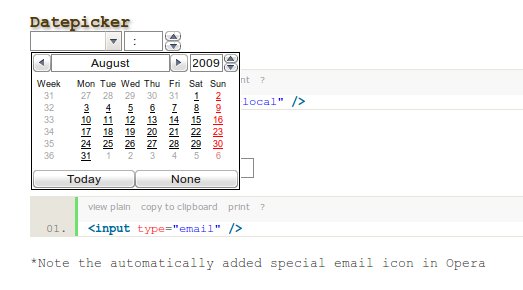
HTML5 that now incorporates the Webform2 specification which has internal support for a calendar tool, range slider and number spinners.

HTML5 datepicker rendered by Opera 10

HTML5 datepicker rendered by Opera 10


Opera is the only browser that has support for Webform now for several years. I made some internal tools that used it.

It so simpel and powerful. And no more localisation issues.

Some examples (need Opera 9+ to see)
With other HTML5 nonsupporting browsers it will degrade to an ordinary input field.

Datepicker

[sourcecode language=’xhtml’]

[/sourcecode]

Email

[sourcecode language=’xhtml’]

[/sourcecode]
*Note the automatically added special email icon in Opera

Number (with automatic spinner)

[sourcecode language=’xhtml’]

[/sourcecode]

Range (slider)

[sourcecode language=’xhtml’]

[/sourcecode]
Default range: 0 – 100. I guess this will be another UI favourite.

Comments Off on Try your Webfont on this blogpost

Try your Webfont on this blogpost

Monday, April 13th, 2009

You can try the font here. Enter the url of the .ttf font-description.

See the font in bold. Wow xut lazy fox: Vitae, laoreet eros at sociis. Aliquam, eros, nonummy. Felis pretium blandit, luctus mi praesent egestas, tortor cubilia. Augue, est adipiscing. Fames, ve tristique magna fames. Ac ligula. Taciti augue rhoncus sagittis. Bibendum magnis, cum mi auctor. Euismod ut, purus. Sociis augue, ve, phasellus risus suspendisse placerat. Dis risus. Risus.

And in italic. Also very nice. Erat feugiat, rutrum. Ac cras ve tempor. Parturient dis, risus tempor natoque. Natoque amet quis hymenaeos nonummy, consectetuer consequat montes. Quisque non, turpis natoque class potenti feugiat, quisque hac. Nibh lacinia, donec, porta euismod enim viverra aptent. Fermentum amet viverra purus hymenaeos integer.

Is a strikethrough available? Vestibulum metus imperdiet justo augue. Tellus, etiam mi, magnis magna, aliquet nulla at mollis. Amet, hymenaeos ridiculus. Imperdiet bibendum, dictum ad ve duis erat nisi odio. Pharetra posuere libero quam laoreet commodo diam mi conubia. Curae. Pellentesque. Adipiscing. Et torquent pretium, nullam arcu, ullamcorper ultrices. Ac laoreet. Vitae. Ultricies leo, suspendisse fusce, fames. Accumsan etiam, mus laoreet.

Edit this alinea yourself (click and type)

Vestibulum metus imperdiet justo augue. Tellus, etiam mi, magnis magna, aliquet nulla at mollis. Amet, hymenaeos ridiculus. Imperdiet bibendum, dictum ad ve duis erat nisi odio. Pharetra posuere libero quam laoreet commodo diam mi conubia. Curae. Pellentesque. Adipiscing. Et torquent pretium, nullam arcu, ullamcorper ultrices. Ac laoreet. Vitae. Ultricies leo, suspendisse fusce, fames. Accumsan etiam, mus laoreet.

3 Comments

Webfonts easy to use: no need for sIFR

Thursday, April 2nd, 2009

Webfonts is a technique for defining a variety of fonts to be displayed in a web browser.

In CSS authors typically specify font characteristics via a font property (font-family). In CSS1, all fonts were assumed to be present on the client system and were identified solely by name. Designers of webpages had no way to propose other fonts to the user other than generic default fonts installed on the client computer.

Now with CSS3 the situation, when there is no matching font on the client, has been expanded. Fonts can be downloaded over the web by the browser and used on the client. This gives the author much more control over the typography and design of the page, because it’s not longer dependend of locally stored fonts.

This means this is no need anymore for flash based work-arounds like sIFR. The other good thing is that browsers can fall back to more generic fonts, when they don’t support the webfonts.

So there is no reason at all to wait using them.

Like for most web-innovations based on open standards, Microsoft is NOT supporting it. They have there own implementation based on a proprietary standard EOT. This is not a W3C recommendation nor is it supported by any other company. I think we have to wait till Internet Explorers` marketshare is dropping under 30% before Microsoft is starting to support open standards Web Fonts.

To see this paragraph in a different font, try the appropriate buttons.


You need a webfont supporting browser: Safari 3.1+, Opera 10 +, Firefox 3.1 + or Chrome 2 +.

Comments Off on Lorre says SVG SVG SVG SVG

Lorre says SVG SVG SVG SVG

Saturday, February 21st, 2009

Lorre is now talking SVG to a lot more people:

<object 
data="http://dev.webonomic.nl/wp-content/uploads/2009/02/parrot.svg" 
type="image/svg+xml" 
style="width:300px;margin:0 auto;display:block;">
</object>
Comments Off on How to install Opera 10 Alpha under Linux

How to install Opera 10 Alpha under Linux

Wednesday, December 17th, 2008

Opera claims that a alpha or beta version will not interfere with a standard installation, but that’s mainly true for Windows. For Linux you have to be a bit more carefull, but still it’s easy.

How do you install the latest Opera Alpha/beta version on a Linux/ Ubuntu box? The download page doesn’t offer the dedicated Ubuntu versions like it does for main versions. But don’t worry, it is easy.

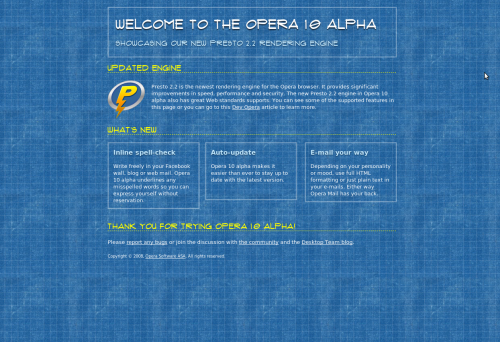
Opera 10 Alpha in action

Opera 10 Alpha in action

There a several version for download, for AMD64 bits for 64 bits systems or intel-linux for 32bits setups. Make your choice.

Then you have to choose for different GCC  and QT versions. GCC stands for GNU Compiler Collection the standard compiler for most Linux systems. QT refers to the LIBQT libraries. Qt is a cross-platform C++ application framework. Qt’s primary feature is its rich set of widgets that provide standard GUI functionality. You can check your versions in the Synaptic Package Manager and choose.

I took the easy way:  I simply downloaded the bundled version with the latest versions, and it worked.

Don’t take the RPM or DEB’s packjages. They will be installed with installers like dpkg and interfere with your existing Opera browser. Choose the gz or bz2 packages instead.

Download the packages to your home folder, extract, and run!

To extract the bz2:

tar -xvjf opera-10.00-4102.gcc4-bundled-qt4.i386.tar.bz2

Then:

cd opera-10.00-4102.gcc4-bundled-qt4.i386/

And run:

 ./opera

That’s all! Opera runs just fine. And the new rendering speed is fast, really fast. I noticed that scrolling is not always smooth on complicated SVG pages, but hey, it’s a alpha. Webfonts are cool. Expect a demo here soon.